How to build and update these docs
Read-the-docs and github
Opening a new pull request (PRs) will trigger the docs to build on read-the-docs. The success of the build will be reported back in the PR with a link to the rtd build log.
Local
Local builds require python >= 3.11 with the following packages installed (see the requirements.txt file in the repository):
sphinx>=6.0
myst-parser
sphinx-rtd-theme
To build a local version of these docs:
Clone the repository (https://github.com/casangi/radpsdocs). Switch to the
radpsdocsdirectory.# If needed, alter github link for your fork git clone https://github.com/casangi/radpsdocs.git cd radpsdocs
Install required dependencies with pip:
pip install -r requirements.txt
Run
maketo build. The local build and HTML files will be placed indocs/_build/.make cd docs/_build/html/ # Open index.html from the browser.
Contributing to the documentation
Contributions should follow the the git feature branch workflow.
This includes:
Create a fork of the
radpsdocsrepository (if one does not exist) from theradpsdocspage (https://github.com/casangi/radpsdocs).Locally, clone the forked repository from the fork’s github page. The link to clone can be copied from the green “<> Code” button.
git clone #Your fork
cd radpsdocs
Add the parent repository to the remote repositories (see this guide):
git remote add upstream https://github.com/casangi/radpsdocs.git
git remote -v # You should see 2 entries for "origin" and 2 for "upstream" in the terminal output
Create a new feature branch. Update and commit to the feature branch.
git checkout -b <your_branch_name>
# make your changes
git add <new or changed file(s)>
git commit -m "Your commit description"
...
Push the feature branch to your fork. Then, from github, open a pull request (PR) to trigger the RTD build.
git push origin <your_branch_name>
Further commits should be pushed to the same feature branch. These will propagate to the PR.
Ensure the RTD build passes in the PR. Each commit will trigger a test build on RTD to preview changes:
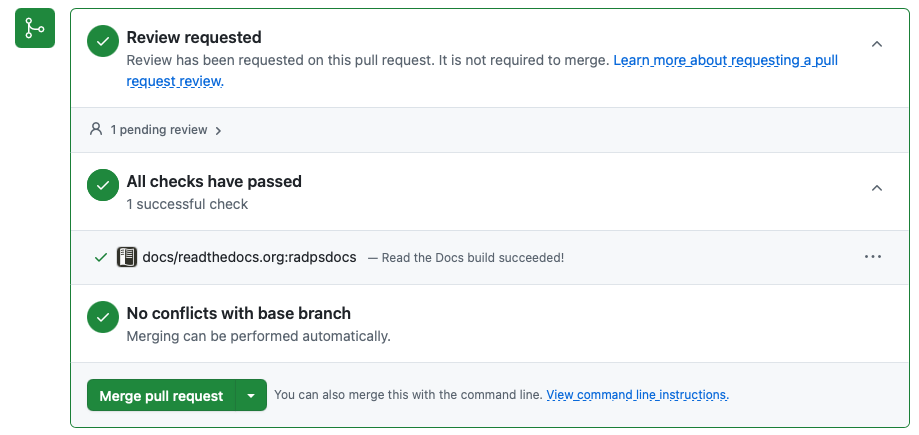
Request a review of the changes prior to merging.
After merging,
click the delete branch button on the github PR

update your local clone and your fork, and delete the local feature branch:
git checkout main
git pull upstream main
git branch -d <your_branch_name>
git push origin main